
Information architects working within enterprises are confronted by unique challenges relating to organisational culture, business processes, and internal politics. Compared to public website or interface design projects, key aspects differ in the application of IA discipline relating to uncertainties around the exact nature of the business problems being solved.
In a typical web or design project, the information architect is given a task, such as:
- Improve the design of the website for consumers
- Develop a user interface for a new business application
- Make it easier for staff to find information on the intranet
In all these cases, the problem is known, and the challenge is to work out the best way to design the solution. User-centered design methodologies then provide a rich toolbox for delivering an effective solution.
However, within the enterprise space, the problem to be solved is often not well understood. For example, information architects may be approached with ill-defined “problems” such as:
- Improve the effectiveness of the intranet
- Help call center staff to access required information
- Increase the uptake of the document management system
- Support sales staff with better online resources
The first task for the information architect in this context is to better understand the problem. Only then can an overall approach be defined, and the normal user-centered design process initiated.
In practice, this means that enterprise IAs often start two steps earlier, focusing first on analyzing needs, and then defining a strategy and scope to meet those needs.
Traditional IA methodologies
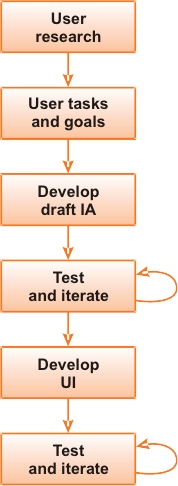 |
| Diagram 1: Illustrates a typical IA approach |
While there are many valid ways to redesign a website or intranet, most projects start with user research to identify user tasks and goals. Then, the IA uses these results to develop a draft IA, which is tested in an iterative manner. Wireframes detail the user interface, and usability testing or similar techniques are used to refine it.
The overall goal of this approach is to clearly understand what the user is trying to achieve when using the site or system, allowing the IA to develop a solution that is both effective and satisfying.
This much is well understood, and much better documented elsewhere.
Enterprise IA approaches
Within the enterprise, the core user-centered design methodology remains just as valid. However, to be effective, the process must start two steps earlier.
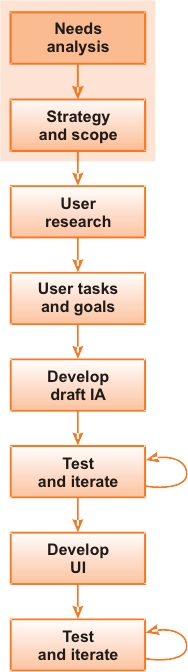 |
| Diagram 2: Illustrates an Enterprise IA approach |
Step 1: Needs analysis
The first step now becomes needs analysis, which uses the same user research techniques as in typical user-centered design (interviews, contextual inquiry, observation), but to different ends. This time, we don’t ask questions about the system, but instead focus on obtaining a more complete and holistic picture of what staff do and the environment in which they work.
This might include questions such as:
- What activities make up your job?
- What information do you need to do these activities?
- Where do you currently get this information?
- How do you find out what’s happening in the organisation?
- What is the most frustrating task you had to complete in the last month?
Rather than support the design process, this research helps the IA understand the nature of the problem. Open-ended and ethnographic, this research will undoubtedly highlight the unexpected and the unknown, both of which radically shape the approach going forward.
(For more on needs analysis in the context of intranets, see my earlier article on this topic, “Succeeding at IA in the Enterprise”)
2: Strategy and scope
The needs analysis then informs the creation of an overall strategy, scope and direction. From this clear framework for the IA work, a comprehensive overall roadmap of the activities required can emerge. The strategy also identifies the most critical issues to be solved, along with the activities with the potential to deliver the greatest business benefits. In this way, the IA work can be targeted for the greatest impact.
In many cases, needs analysis helps the team discover underlying issues which need to be addressed before any IA or design activity can succeed. (Cultural and business process issues are common examples.)
Together, the strategy and scope define the “problem” and provide a concrete context for the user-centered design process. Along with the illumination of the practical aspects of the work to come, the strategy also builds the business case for change and creates a sense of urgency.
A real-life case study drawn from a number of different intranet projects in call center environments illustrates the effects of the enterprise approach.
Case Study: Call Centers
In many organisations, call centers now serve as the primary point of contact with customers or the public. Whether in the insurance industry or within a government agency, call centers handle a huge volume of queries and transactions.
Within the call center, staff work in a high-pressure environment. They are expected to literally answer questions correctly within 30 seconds. Failure to deliver the right information leads to customer complaints or legal liability (organisations are directly responsible for every piece of information given out by a call center). Slow response times can create long queues, more complaints, and customer attrition.
To meet these expectations, call center staff require an effective and well-designed set of information resources. The typical call center intranet contains a large number of documents and news items for staff.
As an information architect, we are often brought into this environment to ‘redesign the call center intranet, to make it into an effective resource for staff. Based on experiences in other environments, it is natural to make a number of assumptions about where efforts should be focused:
- The most common questions or transactions handled by staff should be identified
- Effort should then be focused on providing resources to answer these key tasks
- Paper resources should be migrated onto the call center intranet where possible
- A user-centered redesign should be conducted of the call center intranet, to ensure it is effective
Spend a day or two in the call center, and the gap between these assumptions and reality will quickly become apparent. Let’s look at a call center in the insurance and investment industry.
In this particular case, the most obvious non-technical artifact in the call center was the book of photocopied notes that most staff had sitting beside them, scribbled on and annotated with sticky notes. Then there were the sheets pinned to the cubicle walls, similarly inscribed.
Additionally, product brochures adorned everyone’s desk to cover the 30-40 products sold at any given point. A deeper look uncovered the huge amount of email filed away in folders within Outlook.
There were good reasons why the call center worked in this manner:
- Customers rang up asking, “On page 54 it says this, but what does it mean?” The call center staff needed to quickly access the same page to walk them through the details.
- Key information (such as system codes) needed to be instantly available. Pieces of paper pinned to the wall would always be quicker than looking up an electronic system.
- All important communications were broadcast via email, and maybe (only maybe) added to the intranet. Since the details probably were not needed at that point, it was necessary to file away the emails for later use.
In this situation, we drew some unexpected conclusions from these (and other) observations, even having been primed by previous call center projects.
In the end, our efforts focused on:
- Managing uncommon rather than common details: The information related to the most frequent queries or transactions resided in the heads of staff. The complex issue that only came up every 6-12 months posed the real challenge.
- Capturing old rather than new information: The brochures for the current products worked perfectly well. The real problem came from investment products that could go back decades and were still covered by the original terms of the contract. Finding a 20 year-old printed policy was not easy!
- Eliminating email as the distribution mechanism: As long as email remained the primary way to deliver critical information, the intranet could never succeed. There were also clear productivity benefits in eliminating the duplicated information management conducted by every individual staff member.
The net result was that the call intranet still needed redesigning, but the needs analysis gave a very clear idea of where to focus efforts and identified the unique environmental aspects of call centers to be taken into account when conducting any work.
Solving the Wrong Problem
This case study highlights the importance of conducting the needs analysis process before embarking on any design or development activities. Failure to do so exposes the organisation to the risk of solving the wrong problem—putting significant effort into developing a solution that fails to work in practice.
Always assess the issue at hand to work out whether it is the cause or merely the symptom. For example, the intranet may be very poorly structured, with considerable usability problems. This naturally calls for a user-centered design project delivering a new IA and page layouts.
However, the underlying causes of the problem may be the disorganised publishing model, the lack of resources, or key cultural problems. If only the symptom (the design of the site) is tackled, the site will immediately start to slide back into disrepair the day it is re-launched.
A small piece of initial needs analysis work and strategy and scope planning allows identification of these underlying problems. Address them, if possible, before (or during) the project, improving the chances that the site continues to prosper post go-live.
Summary
Within the enterprise environment, our methodologies must start two steps earlier than the typical user-centered design process.
- Make use of holistic needs analysis techniques to build a clear picture of the real needs and issues of staff, along with an understanding of the environment in which they work.
- Then create a meaningful strategy and scope that identifies the symptoms and the causes. This information allows us to correctly target our work and ensure that we deliver solutions that actually work for staff.
(All of this is not to say that it’s easy to get the opportunity or the mandate to conduct this initial work, before being forced to jump straight into the design process. But it is possible—we’ve done it many times—and a discussion of how to tackle the broader positioning of enterprise IA will have to wait until another article.)
About the author
James Robertson is apparently the “intranet guy,” or so he was told at the IA Summit in Vancouver. He runs Step Two Designs (www.steptwo.com.au), a consultancy based in Sydney, Australia, and has written over 150 articles on intranets and content management, which can be found on his site. He also has a blog, the writing of which gives him something to do each morning while his brain warms up.
The description of the “Enterprise IA Approach” is spot on – early thinking uncovering the strategy which drives the scope (to use JJGs planes) which then leads into more detailed research/thinking to define the structure, skeleton, surface, etc. HOWEVER, why is this exclusive (or more predominant) to an Enterprise environment? Many IAs (and people who have never heard of the term IA) are doing just that in a non “Enterprise” space.
James:
I always appreciate your articles, since enterprise-scale projects have been my bread-and-butter.
I generally agree with this article, but I think that you are creating terms (or not using terms) for things that already exist (and have perfectly adequate labels). As a result, the water gets a bit muddy.
This muddiness concerns me, because working within the enterprise places a premium on communication across disciplines and organizational levels. As a result, using terms that are well-understood is critical to accelerating and achieving success.
Please bear with me here as I quote you and provide alternatives.
You wrote:
“The needs analysis then informs the creation of an overall strategy, scope and direction. From this clear framework for the IA work, a comprehensive overall roadmap of the activities required can emerge. ”
You also refer to this process as a “holistic needs analysis.”
I would call these activities “Requirements Gathering” and “Business Analysis”. These are traditional terms that are understood throughout the enterprise. Personnel with these skill sets are found in many levels of the organization, so it is easy to get a group to grok the activities you (so rightly) identified.
While I understand that there are nuances (you appear to be emphasizing the ethnographic elements of the needs analysis), I do not nees the value of applying a new label to an old task.
You also wrote:
“The strategy also identifies the most critical issues to be solved, along with the activities with the potential to deliver the greatest business benefits. In this way, the IA work can be targeted for the greatest impact.”
and
“Together, the strategy and scope define the “problem” and provide a concrete context for the user-centered design process. Along with the illumination of the practical aspects of the work to come, the strategy also builds the business case for change and creates a sense of urgency.”
I would call strategy and scope development “Product Management”. Again, this is a term well-defined within the enterprise. In this case, you did not apply a new label. I would, however, call it what it is.
While I fully recognize that there are nuances, I find that I have far greater success using generally-accepted terms for processes and roles that already exist within the enterprise.
One of my criticisms of the IA community is that we tend to make it all about us. In this sense we are pre-copernican: the universe exists around the IA.
The reality is far different: IA is a component of the greater enterprise. We need to better understand how we fit into that particular picture.
Excellent article James. I will pin Diagram 2 on my office wall.
I don’t think the methodology you suggest is confined only to the enterprise space. Conducting a needs analysis and documenting strategy and scope is good practice in any project.
Thanks for a good read James. A couple of comments: You said of user needs research:
“Rather than support the design process, this research helps the IA understand the nature of the problem.”
Maybe I’m picking at semantic nits, but it seems to me that because a “design” in our world is a functional description of a problem-solving tool, there is very little – maybe no – difference between understanding the nature of the problem and the early stage design process.
My last comment is on your “strategy and scope” section: for anyone interested in a structured approach to negotiating strategy and scope, I HIGHLY recommend Adam Polansky’s chapter in “Usability Success Stories.” Full disclosure: I edited the book. But I’m propping Adam, not me.
I find I just keep returning to Adam’s case study for bite-sized nuggets of smartness.
I totally agree with your approach. In my experience the data required for a really effective EIA is rarely available unless you go out and get it. On many occasions when I have conducted research amongst staff members (for both quality and IA issues) they have commented that it had been the first time that anyone in the organisation had asked what they thought of anything.
Regarding ‘ethnography’, I’ve been doing it for years and didn’t know. That will look good on my CV!
James, thanks for bringing up the more strategic aspects of the work we do. I do think that many IA/usability/UCD people can be overly focused on the tactical “problem solving” aspect of our work. Good architects should always be looking for underlying business and user needs to provide value. Like Ray said, though, we are really not doing structurally anything different than has been traditionally done in product development. What I think we do very differently is apply design practices (prototyping, iterations for example)to business problems. We also uncover issues through a bottom up approach (interviewing, field studies, etc.). The iterative, empirical, user centered processes we use are what differentiate us from the other traditional processes.
James, thanks for writing this. I think that one of the easiest mistakes IAs can slip into is to dive in to start working a problem that a client hands to them, rather than investigating to see whether the problem a client thinks they have is the real challenge.
James, this is a very good article outlining what needs to be done before tackling the problem already defined by our clients, especially for internal applications (ie. intranet projects). As you mention, many times, the real problem is not well understood by the client and they tend to focus on common and/or popular solutions rather that understanding the real problem and finding the proper solution.
I would like to mention though, that ‘needs analysis’ is successful if performed inside the organization because we have direct contact with staff and other workers within the organization. As for building external web applications or websites, where the general internet user will use the application, I find it hard to incorporate a ‘needs analysis’ approach since I don’t have direct contact with external users. Putting together a ‘Business Analysis’, ‘Project Requirements’ on the organization side of things, and a ‘User research’, ‘User tasks and goals’ on the user side on things, help identify what the ‘needs analysis’ achieves for the internal projects. Or, do you have an example on how to use this approach on external web applications?
Juan – in many cases it does all come down to some kind of contact with external users. We’ve been successful at doing the kind of things James highlights with external users – see a presentation myself and a colleague gave at the 2005 IA Summit: A Foray across Boundaries: Applying IA to Business Strategy and Planning (http://www.iasummit.org/2005/finalpapers/104_Presentation.ppt) – the Capability Discovery Map in the first case study was a way to bring together external user and internal stakeholder goals/needs/points of pain.
Interesting read. Even beeing “insiders” we need to spend large amounts of time to understand the business processes of our own departments.
Creating a new service or changing an existing service might be easy if you have to deal with simple business tasks (as the call center operation you descibed), but gets very difficult if business stuctures are unstructured or differ by location or country. In a simple case like the one described, with stable operational processes it might be sufficient to visit a department for some time to get a good understanding. But how do you handle a situation where you deal with departments in several countries, with different national legal regulations, different ways of “how we do it over here” and all the political issues that will come up when you start to change people’s workspace?
I am also wondering whether the sequential approach you descibe is the right way here? If business processes cannot be made transparent (despite thorough analysis) and you need the stakeholder’s “buy in”, a rapid approach with frequent feedback to and involvement of the stakeholders might be more appropriate.
What is your experience?
This is a great article. Thank you.
Nice approach of user needs. In my opinion, these two steps are also neccesary in web or design projects too.Throughout each project development the main focus should be on users needs (by users I mean the people working inside the company that i.e. need a redesign of their web site) as they will actually interact with the system once it is finished. Before starting to develop a draft IA, much time and thought should be spent on how you’ll identify user needs and developing an overall stategy by indicating the objectives and scope of the system.
Thank you, James. This is my first read on ‘boxesandarrows’ as well as my first post. I am an emerging IA within my company and self-taught (and still learning). Your article has hit on some very key issues that reinforce some ideas I’ve had about Requirements Gathering and Needs Analysis. I look forward to learning a lot more with you and everyone else here, as well as sharing our experiences. Thank you again for a great post and an interesting read. -Evan